No not wooden logs, contest logs.
Field Day 2009 was great. (photos HERE) The club did well, but not as good as I would have imagined we could do. The DVK setup was a miserable failure. I had to resort to manual phone operation. But still, that aspect did not prevent any contacts. We got the contacts we got (524), and didn't 'lose' any, band conditions were miserable on 40M. More about that in another post...
So it's 2:PM or so on Sunday, and I am shutting stuff down and packing it up, I go to save the log to a USB flash drive, and nada. N3FJP Field Day logging software saves it in the Program Files (i86) folder. So I go looking for them. Nada. Nothing. WHERE'S MY LOG FILES?!?!
Apparently, starting in Vista, Microshaft started 'caching' files in an obscure location. Apparently M$ doesn't trust us to do things normally, so they need to do things abnormally for us. Seems like there is an AppData folder somewhere that contains all sort of 'user' files that we aren't trusted or even allowed to access. It is called 'Compatibility Files' in Microgeek talk.
In my opinion, virtualization is another way for Microsux to say "I know something you don't know"...
The official word on this is that starting in Vista, the rules are that if you don't have explicit (by requesting) elevated permissions to write to C:\Program Files, the system lets you think you are writing there but actually redirects (virtualizes) your writes elsewhere. (or so Scott Hanselman sez...)
On the surface, this sucks in a huge way, especially for ANYBODY in the "where are my files" kind of way. As far as programs on my system, there's a number of "mal-behaved" programs that are getting their writer redirected to the "Virtual Store." Of note are MSN Messenger, the new Nero, and FireFox. I think it is the main reason Win 7 was destroyed (went FUBAR) by Directory Opus 9 a week before Field Day. On a 64-bit system the implications are even worse...
Hanselman also sez:
The other really bad UI issue is that there's no way to get to the compatibility-based Virtual Store from the common file open/save dialogs. The same redirection CAN happen with apps that try to write to registry in HKLM, so watch for that also if something "goes missing."
I can see how hard they're working to make Vista more secure while still maintaining extensive backward compatibility. I haven't had any apps (other than one Java app) bork under Vista yet, but things like this Virtual Store will be confusing until new minor releases of apps with a modicum of Vista-awareness come out.
So where are my logs? When you open Windoze Explorer and you access a folder that has 'virtualized' files, a toolbar button appears that is labeled 'Compatibility Files', click on that button, and voila! There are your files. You can treat them as if they actually exist where you see them...
Showing posts with label Microsoft. Show all posts
Showing posts with label Microsoft. Show all posts
Monday, June 29, 2009

Tuesday, June 23, 2009
Another Laptop Arrives...
New Dell Latitude E6500 15.4" Demo Laptop
First thing I did was wipe XP off it and install Win 7. Now yet again I am struggling with drivers as well as the initial setup. One would think I would learn after awhile...
This machine scores a 4.0 on the Experience Index, lowest performance is the Aero Graphics. Everything else is a 5 or above. I think it is usable. It only has 4G RAM and a 160Gb HD, but so far the laptop isn't too bad. It is heavy though, and size has its advantages as well as disadvantages. There is plenty of audio (more about full-duplex later) and I kinda like the keyboard. There is a really slim power adapter, whose led power-on indicator is a blue led ring around the power plug where it connects to the laptop. Cool, but more glitz I can live without. Probably necessary for those idiots who cannot tell if there is power coming outta their adapter...
The WI-FI adapter is an Intel 5100 AGN, and I am not impressed with its performance. Seems it only connects at 52 mps, where an Intel 4965 will connect from this same spot at 130 mps. I will look into that. It has the obligatory fingerprint swipe device, which I chose not to install drivers for. Biometrics is nice, but I have yet to find a device that doesn't act like a TSR and leak memory like a sieve. Oh well.
Bigger is generally better, but in this case I think it may be a big drawback. If you are looking for a desktop replacement, then sure, this is your baby. If it won't leave your desk (or kitchen table) except for Sunday dinner, then you won't mind how heavy it is. But if you have to carry this to meetings, and then home each day, I think the size and weight is a showstopper. Sure a 15.4" widescreen laptop is nice when you play a movie, or edit a photo, the resolution (1920X1200 WUXGA) makes it shine. But walk a hallway every day with this beast, and I can guarantee you will prefer to take notes with a pencil and paper rather than drag this monster to another meeting.
If I had to buy one for my own use, I would equip it with 8G RAM (doesn't support 16G), the WUXGA display, 500Gb 7200RPM drive and the nVidia NVS graphics adapter. Maybe then I could eek out a 5.0 on the EI, as long as I had the T9800 Core2 Duo. Even better yet, configure an E6400 like that and shed a pound or two minimum. 9-cell batteries, even LI-ION add quite a bit of weight. The E6500 STARTS at 5.17 lbs, with the 4-cell battery and no optical drive. Load it up and it makes a great door stop...
The wireless works better now, I adjusted the 802.11n settings and I consistently get 120-135 mps connect speeds now. All I need to do is test the thruput. That, and test the audio. I will need to get full-duplex working in some sort of fashion in order to use it with the ham radio equipment. I will TRY the default 'listen' control before I start hacking the registry. I promise. All I need to do is find the time...
First thing I did was wipe XP off it and install Win 7. Now yet again I am struggling with drivers as well as the initial setup. One would think I would learn after awhile...
This machine scores a 4.0 on the Experience Index, lowest performance is the Aero Graphics. Everything else is a 5 or above. I think it is usable. It only has 4G RAM and a 160Gb HD, but so far the laptop isn't too bad. It is heavy though, and size has its advantages as well as disadvantages. There is plenty of audio (more about full-duplex later) and I kinda like the keyboard. There is a really slim power adapter, whose led power-on indicator is a blue led ring around the power plug where it connects to the laptop. Cool, but more glitz I can live without. Probably necessary for those idiots who cannot tell if there is power coming outta their adapter...
The WI-FI adapter is an Intel 5100 AGN, and I am not impressed with its performance. Seems it only connects at 52 mps, where an Intel 4965 will connect from this same spot at 130 mps. I will look into that. It has the obligatory fingerprint swipe device, which I chose not to install drivers for. Biometrics is nice, but I have yet to find a device that doesn't act like a TSR and leak memory like a sieve. Oh well.
Bigger is generally better, but in this case I think it may be a big drawback. If you are looking for a desktop replacement, then sure, this is your baby. If it won't leave your desk (or kitchen table) except for Sunday dinner, then you won't mind how heavy it is. But if you have to carry this to meetings, and then home each day, I think the size and weight is a showstopper. Sure a 15.4" widescreen laptop is nice when you play a movie, or edit a photo, the resolution (1920X1200 WUXGA) makes it shine. But walk a hallway every day with this beast, and I can guarantee you will prefer to take notes with a pencil and paper rather than drag this monster to another meeting.
If I had to buy one for my own use, I would equip it with 8G RAM (doesn't support 16G), the WUXGA display, 500Gb 7200RPM drive and the nVidia NVS graphics adapter. Maybe then I could eek out a 5.0 on the EI, as long as I had the T9800 Core2 Duo. Even better yet, configure an E6400 like that and shed a pound or two minimum. 9-cell batteries, even LI-ION add quite a bit of weight. The E6500 STARTS at 5.17 lbs, with the 4-cell battery and no optical drive. Load it up and it makes a great door stop...
The wireless works better now, I adjusted the 802.11n settings and I consistently get 120-135 mps connect speeds now. All I need to do is test the thruput. That, and test the audio. I will need to get full-duplex working in some sort of fashion in order to use it with the ham radio equipment. I will TRY the default 'listen' control before I start hacking the registry. I promise. All I need to do is find the time...
Wednesday, June 10, 2009
What Win 7 WON'T do...
Direct cable connection is gone...
I guess I should say that I haven't figured it out yet rather than that it doesn't work... Just like everything else in Win 7 it takes a bit more time to figure out because it is new. In all reality I don't even know how important it is anyway.
Last night I was xferring a couple files (Win 7 RC ISO file so I can burn a disk...) and they were rather large, over 3Gb each. This Dell Latitude D630 has an Intel 4965 AGN wireless adapter, which connects at a minimum of 130 mps, but the IBM ThinkPad T60 has only an Intel 3945 ABG that will max out at 54 mps. Ever transfer a file at 54 mps?
I used to, back when slow networks were all the rage. Here at home I have a gigabit ethernet backbone thru a Link-Sys (Cisco) switch, with a D-Link DIR-655 wireless N router connected to the DSL modem. With a 25/2 connection, shit screams across the Internet here. It easily supports all I wanna do, as well as the other dozen or so computers on the network at any one given moment. The local gigabit speeds aren't really necessary, unless you are xferring large files and want to do it in a short amount of time. Nice to have though, seeing how almost everything I have on the network has a gigabit adapter.
So I figure that I can use the gigabit adapters in these 2 laptops to xfer files much quicker than the 54 mps the IBM will max out at. Again, I figured wrong. Connecting a crossover ethernet cable and setting static IP addresses was all anyone needed to do with XP, and I have used it numerous times in the past. Even at a lowly 100 mps things go rather quickly.
Win7 is advanced enough that I don't even need to use a crossover cable, a regular CAT5e cable will work, apparently. They connect easy enough, but if you think I could get them to talk to each other, boy were you wrong. I still haven't figured this out. Luckily I have the hard drives with the previous OS still intact, and if I can't figure this out in Win7 I am gonna pop the old drives back in just to test Vista and XP to see if the laptops actually do work in this direct-connect configuration.
Anyway, one thing Win7 WILL do is burn an image file, natively. Just double click the ISO file, and Windows Disk Image Burner pops up and prompts you to choose or verify your CD/DVD burner drive. Kinda cool, really. I wonder what else will surprise me next...
I imagine if I can get this direct connect thing working, it will surprise me. M$ dropped direct connect FireWire support with Vista, but I imagine you can get 480 mps throughput with USB. Or so they claim. Kinda like new car MPG ratings. You only get that mileage going downhill, coasting in neutral with a tailwind. In order to get 480 mps throughput with USB you need to connect two supercomputers in a refrigerated server room and use pure gold cable. Go figure.
Anyway it appears as though Win7 is pretty stable, I have installed it on a few machines and except for one installation in particular, they have all been rock-solid stable. Other than the few annoyances detailed in this blog things run OK, and if they don't run OK, there are tricks you can pull to get then going. Like running video drivers in compatibility mode. Sure, it isn't the best thing to do, but to me, the end always justifies the means.
I guess I should say that I haven't figured it out yet rather than that it doesn't work... Just like everything else in Win 7 it takes a bit more time to figure out because it is new. In all reality I don't even know how important it is anyway.
Last night I was xferring a couple files (Win 7 RC ISO file so I can burn a disk...) and they were rather large, over 3Gb each. This Dell Latitude D630 has an Intel 4965 AGN wireless adapter, which connects at a minimum of 130 mps, but the IBM ThinkPad T60 has only an Intel 3945 ABG that will max out at 54 mps. Ever transfer a file at 54 mps?
I used to, back when slow networks were all the rage. Here at home I have a gigabit ethernet backbone thru a Link-Sys (Cisco) switch, with a D-Link DIR-655 wireless N router connected to the DSL modem. With a 25/2 connection, shit screams across the Internet here. It easily supports all I wanna do, as well as the other dozen or so computers on the network at any one given moment. The local gigabit speeds aren't really necessary, unless you are xferring large files and want to do it in a short amount of time. Nice to have though, seeing how almost everything I have on the network has a gigabit adapter.
So I figure that I can use the gigabit adapters in these 2 laptops to xfer files much quicker than the 54 mps the IBM will max out at. Again, I figured wrong. Connecting a crossover ethernet cable and setting static IP addresses was all anyone needed to do with XP, and I have used it numerous times in the past. Even at a lowly 100 mps things go rather quickly.
Win7 is advanced enough that I don't even need to use a crossover cable, a regular CAT5e cable will work, apparently. They connect easy enough, but if you think I could get them to talk to each other, boy were you wrong. I still haven't figured this out. Luckily I have the hard drives with the previous OS still intact, and if I can't figure this out in Win7 I am gonna pop the old drives back in just to test Vista and XP to see if the laptops actually do work in this direct-connect configuration.
Anyway, one thing Win7 WILL do is burn an image file, natively. Just double click the ISO file, and Windows Disk Image Burner pops up and prompts you to choose or verify your CD/DVD burner drive. Kinda cool, really. I wonder what else will surprise me next...
I imagine if I can get this direct connect thing working, it will surprise me. M$ dropped direct connect FireWire support with Vista, but I imagine you can get 480 mps throughput with USB. Or so they claim. Kinda like new car MPG ratings. You only get that mileage going downhill, coasting in neutral with a tailwind. In order to get 480 mps throughput with USB you need to connect two supercomputers in a refrigerated server room and use pure gold cable. Go figure.
Anyway it appears as though Win7 is pretty stable, I have installed it on a few machines and except for one installation in particular, they have all been rock-solid stable. Other than the few annoyances detailed in this blog things run OK, and if they don't run OK, there are tricks you can pull to get then going. Like running video drivers in compatibility mode. Sure, it isn't the best thing to do, but to me, the end always justifies the means.
Friday, June 5, 2009
Mac versus PC - Yet Again...
Apparently I have offended Mac users again.
Let me put it this way - If I haven't offended you, stay tuned, your time will come. I gotta admit, I am not trying to piss anyone off in particular, I do find it truly unfortunate if you fall into one of the groups I may poke a little fun at from time to time. My intent is not to offend anyone, but to point out shortcomings in inferior products, services, companies and ultimately, in society itself.
To say something is 'so easy a Mac user could do it' is not a phrase that I invented. Again I have to admit I heard that one somewhere, and it rung so true I had to repeat it. Call it plagurism or whatever you want, but even you have to admit Mac users are either stupid, or lazy. Personally, because I am a Mac user, I fall into the lazy end of that spectrum. Now if I cannot poke a bit of fun at myself, then our society and its political correctness has truly come full circle and we are living in a communist country. I know this is not the case.
I use a Mac when I WANT to, and I suppose it really all boils down to choice. If you choose to use a Mac you are lazy. If you HAVE to use a Mac you are stupid. Simple, huh? Sometimes people point out to me the difference between stupidity and ignorance, and while I possibly have the definitions reversed in my mind, it still is a shame. Plain outright disgraceful. I have always said that I can understand stupidity, but there is no excuse for ignorance. Laziness is another story altogether, laziness is just genius disguized in arrogance.
There is nothing you can do on a Mac that cannot be done on a PC, the reverse holds true. This has been the case for quite some time now, at least since OS X 10.4.11. That is the version that will allow Active Directory 'binding'. Basically that means your Windows Domain can recognize a Mac and that your Domain account can 'pass through' the authentication necessary to gain Domain permissions. What does that mean in layman's terms? It means your Mac will finally work (somewhat) in the corporate business world where we all live and play. It has left the 'home' domain and entered the real world.
Does this mean I will abandon all my PC's and cross to the dark side of OS X? Not friggin' hardly. Same way I am not EVER gonna abandon my Nikons and join the Canon camp. While there are some who might state 'the best hardware for running Windows is made by Apple', there are also those who have risen above the Mac vs. PC war and instead of wasting time arguing about which is better, are actually using computers for their designed intent - as a tool to navigate the socio-political labrynth we must compete in on a daily basis.
I may use a Mac from time to time, same way I will probably use a PowerShot when I want to. To me it is all about choice. I do what I want, not because I have to but because I choose to. If that makes any sense... (read - psychobabble...) It is kinda like using the best tool for the job at hand. If you only have a Leatherman instead of a full toolbox, you use what you need to to get the job done. This is the pitfall many Mac users fall into. Instead of possibly using their money in the best possible fashion, they tend to waste most of it because of two reasons I have previously mentioned.
There are those who will say that Macs are less prone to viruses than PC's. There are hundreds of arguments in either direction, but suffice it to say there are more viruses and attacks written for the UNIX platform than anything else. And what is OS X written/based upon? UNIX. Try telling the poor lady whose Safari browser has been hijacked by Malware and has a million pop-ups telling her that her computer needs new virus detection software that Macs are better. Apparently, they look pretty much the same as a PC.
Again, place either platform in front of me and I will pretty much be able to do the things I need to do without too much trouble. I will bet right now you cannot tell if I have typed this blog post on a Mac or a PC. In the truest sense of the word it really doesn't matter, does it? Marshall McLuhan said it best when he described popular culture with the statement 'The Medium Is The Message...'.
Anyway, my point is, I choose to poke fun at stereotypical users, and I have very little tolerance for incompetence. Same way I will pick on the Goths, the Towel-Heads and the Wetbacks, it was not I that invented these racial slurs. Is it immature and evil to refer to people in this manner? Yes. Do you fit into one of those groups? If so, it really does suck being you. Same way I fall into the stereotypical white, overweight, Type A male model. It sux being me too.
It sucks being me because I have to deal with the Mac users and other general incompetence so prevalent in our society today. It is even more so here in the Upper Valley. I truly find it amazing and sometimes wonder as I try to fall asleep at night, how the majority of people around here got and actually keep their jobs. Don't get me wrong here, there are people who actually know how to maintain their computers and networks around here, but like anywhere else, they are few and far between.
This is the exact reason our society as a whole is shifting away from computers as we knew them in the '90's toward a more manageable 'personal device' model such as the cell phone and PDA. To pick up where McLuhan left off and to make the statement that PDA's will revolutionize how we learn, communicate and generally interface with others is a natural statement, but I fear that the technology that lead us to this point will generally be ignored, much like the industrial revolution, and lead to the downfall of American society as we currently acknowledge it.
More psychobabble, I know, but it is relevant. It is because we are lazy and stupid Mac users.
Let me put it this way - If I haven't offended you, stay tuned, your time will come. I gotta admit, I am not trying to piss anyone off in particular, I do find it truly unfortunate if you fall into one of the groups I may poke a little fun at from time to time. My intent is not to offend anyone, but to point out shortcomings in inferior products, services, companies and ultimately, in society itself.
To say something is 'so easy a Mac user could do it' is not a phrase that I invented. Again I have to admit I heard that one somewhere, and it rung so true I had to repeat it. Call it plagurism or whatever you want, but even you have to admit Mac users are either stupid, or lazy. Personally, because I am a Mac user, I fall into the lazy end of that spectrum. Now if I cannot poke a bit of fun at myself, then our society and its political correctness has truly come full circle and we are living in a communist country. I know this is not the case.
I use a Mac when I WANT to, and I suppose it really all boils down to choice. If you choose to use a Mac you are lazy. If you HAVE to use a Mac you are stupid. Simple, huh? Sometimes people point out to me the difference between stupidity and ignorance, and while I possibly have the definitions reversed in my mind, it still is a shame. Plain outright disgraceful. I have always said that I can understand stupidity, but there is no excuse for ignorance. Laziness is another story altogether, laziness is just genius disguized in arrogance.
There is nothing you can do on a Mac that cannot be done on a PC, the reverse holds true. This has been the case for quite some time now, at least since OS X 10.4.11. That is the version that will allow Active Directory 'binding'. Basically that means your Windows Domain can recognize a Mac and that your Domain account can 'pass through' the authentication necessary to gain Domain permissions. What does that mean in layman's terms? It means your Mac will finally work (somewhat) in the corporate business world where we all live and play. It has left the 'home' domain and entered the real world.
Does this mean I will abandon all my PC's and cross to the dark side of OS X? Not friggin' hardly. Same way I am not EVER gonna abandon my Nikons and join the Canon camp. While there are some who might state 'the best hardware for running Windows is made by Apple', there are also those who have risen above the Mac vs. PC war and instead of wasting time arguing about which is better, are actually using computers for their designed intent - as a tool to navigate the socio-political labrynth we must compete in on a daily basis.
I may use a Mac from time to time, same way I will probably use a PowerShot when I want to. To me it is all about choice. I do what I want, not because I have to but because I choose to. If that makes any sense... (read - psychobabble...) It is kinda like using the best tool for the job at hand. If you only have a Leatherman instead of a full toolbox, you use what you need to to get the job done. This is the pitfall many Mac users fall into. Instead of possibly using their money in the best possible fashion, they tend to waste most of it because of two reasons I have previously mentioned.
There are those who will say that Macs are less prone to viruses than PC's. There are hundreds of arguments in either direction, but suffice it to say there are more viruses and attacks written for the UNIX platform than anything else. And what is OS X written/based upon? UNIX. Try telling the poor lady whose Safari browser has been hijacked by Malware and has a million pop-ups telling her that her computer needs new virus detection software that Macs are better. Apparently, they look pretty much the same as a PC.
Again, place either platform in front of me and I will pretty much be able to do the things I need to do without too much trouble. I will bet right now you cannot tell if I have typed this blog post on a Mac or a PC. In the truest sense of the word it really doesn't matter, does it? Marshall McLuhan said it best when he described popular culture with the statement 'The Medium Is The Message...'.
Anyway, my point is, I choose to poke fun at stereotypical users, and I have very little tolerance for incompetence. Same way I will pick on the Goths, the Towel-Heads and the Wetbacks, it was not I that invented these racial slurs. Is it immature and evil to refer to people in this manner? Yes. Do you fit into one of those groups? If so, it really does suck being you. Same way I fall into the stereotypical white, overweight, Type A male model. It sux being me too.
It sucks being me because I have to deal with the Mac users and other general incompetence so prevalent in our society today. It is even more so here in the Upper Valley. I truly find it amazing and sometimes wonder as I try to fall asleep at night, how the majority of people around here got and actually keep their jobs. Don't get me wrong here, there are people who actually know how to maintain their computers and networks around here, but like anywhere else, they are few and far between.
This is the exact reason our society as a whole is shifting away from computers as we knew them in the '90's toward a more manageable 'personal device' model such as the cell phone and PDA. To pick up where McLuhan left off and to make the statement that PDA's will revolutionize how we learn, communicate and generally interface with others is a natural statement, but I fear that the technology that lead us to this point will generally be ignored, much like the industrial revolution, and lead to the downfall of American society as we currently acknowledge it.
More psychobabble, I know, but it is relevant. It is because we are lazy and stupid Mac users.
Thursday, June 4, 2009
Finally. Play and Burn DVD's in Win 7
No need for extra programs... it is built-in!
That's right kiddies, no need for extra dedicated DVD software anymore, it is finally built into Microshaft Windows 7. It is kinda refreshing to see that they hired some developers from Apple right out from under Steve Job's nose to include the crap that should have been in there from the start.
So, you install Win 7, and after it is all updated you decide to put in a DVD to watch a movie. I did this just to see if it would work, and lo-and-behold, it does! Holy Blu-Ray Batman! What is even better is that you can now just drag files to a blank DVD (if you have a DVD writer) and then click burn-to-disc. Windows Explorer now supports native burning to DVD!
Goodbye Nero, so long WinDVD and PowerDVD! I don't need to run additional brain-dead applications just to do basic functions that should have been included from the get-go. Let's see what else it can do...
Maybe I wanna take all the neat new digital video I just shot and create a cohesive movie of clips, think I can do that? Yup. Run what is called Windows DVD Maker and you are all set. I gotta admit I haven't tried to use it to actually make a DVD movie (I have no digital video recorder...) but I have played with it a bit to see what it actually does. I will bet the media types out there will still feel they need some fancy-schmancy additional ill-behaved app to do this like Adobe Premiere or some other movie-maker program, but by and large, when you turn your 4-year old loose with all you electronic crap they will be the next Martin Scorsese in no time at all.
But when you are facing a class full of students and you pop the DVD in of the coolest movie you ever saw, hoping Windoze Media Player will handle things on your newly upgraded machine, you needn't worry. Even if you need to setup Media Player by choosing Express Settings first, it won't take but a moment before the movie actually starts. No show-stopping message about some 'codec' not installed, it just plays. Like I have said before, Win 7 just works.
Don't get me wrong, I am certainly not on the Microstink payroll, nor do I advocate everyone install this new OS on their computer(s). Personally I feel if you are not smart enough to maintain your OS (read Mac user here) you don't deserve to use a computer, much less own one. I just think I can spot a good one in a row of mediocre OS's. I think I have been around a bit (others might say I am about as round as one can get...) and having used, programmed, built and maintained computer systems and networks since the '70's I feel I might be able to give a bit of advice now and then. This OS is good, but I am absolutely certain there will be those who will bash it no matter what. I might even be one of them...
Take for example Windowz Media Player. It has to compete with iTunes. Can you connect your iPod? No. You need to run iTunes to sync your iPod. Why? Because Apple pulled a microsoft. (lower case noun) Also take for example when one might play a DVD. When you want to skip to the next chapter, what button do you press? PageDown? Of course. How about pause the movie? SpaceBar? Yup. All major DVD software does this, or allows you to program the keys you want to do this. What about Media Player? Guess again.
To advance to the next chapter of a movie DVD playing in Media Player, you press Ctrl-F .What the hell? What does the F key have to do with chapters? Not even the arrow keys work in Media Player. Microstupid - Take a hint... Develop Media Player into a mature program instead of allowing it to suffer Alzheiumers and turn into yet another brain-dead, ill-behaved add-on application. What the hell were you thinking? How about using the mouse wheel to advance the speed (or decrease it...) and setting it up so I can sync an iPod? What about removing all the advertizing crap with all these unnecessary 'stores' to buy songs? The only time I want to think about 'Urge' is when I take a crap. This doesn't even mention DRM (Digital Rights Management) which has turned into a porn-spam sending scam when you try to play someone else's idea of 'protected' content. If you wanna protect something, sell it in a real store at a price people will be willing to pay for it. If your music sucks, then give it away. If you wanna sell a million copies of your new movie, sell it for $1.99 on a self-destructing DVD. Nobody is gonna waste $2.25 for a DL DVD to copy a $1.99 movie...
And make Media Player work like it used to... When I play an album, put the album cover in the middle of the friggin' screen. If you are gonna put a 'Lyrics' button somewhere, there ought to by lyrics behind the button when I click on it. Not a window where I can type in text... And give me a remote control. Infared has been built into computers since the '80's, it is just a freakin' LED for crying out loud. And also, let me use the IR built into my computer to control my TV and stereo. I do have to admit I don't necessarily like the idea of a $1900 remote, but you gotta admit, it certainly would be convenient.
But then again, this is only the Release Candidate! (RC... is just another term for Beta) I can only imagine what it will be like when the full version is released in October. Yes, kiddies, OCTOBER. Chances are the upgrade version will be out-the-door in August, personally I would hold out for the full Win 7 Ultimate version, it is what I am running now in RC, and seems to do almost everything right. I imagine I will start planning for the Business version where I work (school), even then it won't be at least until next summer when I roll it out. Hopefully it will be available on the new Dell's in some sort of affordable version.
Native support for this kind of stuff should have been included as far back as Win '95, but Microsux in their infinite corporate wisdom decided that it was more important to spawn the 'Accessory Application' market and charge developers not only for their OS, but for the rights to develop stuff for their OS. Kinda like the grocery store charging for food, and then charging you again for the rights to cook it. Brilliant strategy, compliments of Steve Ballmer. He learned it from Bill Gates back in college. If you don't believe me, watch the DVD Pirates Of Silicon Valley sometime. You will find out the real suckers aren't the American people, but IBM and XEROX.
But wait! I just rented this DVD Pirates Of Silicon Valley, and I now want to add it to my library of other 'pirated' DVD's... (just kidding, I don't advocate stealing anything, if I have to pay for it YOU should have to as well... I don't have a library at all.) For this example, I am not allowed to duplicate a DVD, especially a copyrighted one at that.
Maybe THERE IS a market for brain-dead, ill-behaved apps after all...
That's right kiddies, no need for extra dedicated DVD software anymore, it is finally built into Microshaft Windows 7. It is kinda refreshing to see that they hired some developers from Apple right out from under Steve Job's nose to include the crap that should have been in there from the start.
So, you install Win 7, and after it is all updated you decide to put in a DVD to watch a movie. I did this just to see if it would work, and lo-and-behold, it does! Holy Blu-Ray Batman! What is even better is that you can now just drag files to a blank DVD (if you have a DVD writer) and then click burn-to-disc. Windows Explorer now supports native burning to DVD!
Goodbye Nero, so long WinDVD and PowerDVD! I don't need to run additional brain-dead applications just to do basic functions that should have been included from the get-go. Let's see what else it can do...
Maybe I wanna take all the neat new digital video I just shot and create a cohesive movie of clips, think I can do that? Yup. Run what is called Windows DVD Maker and you are all set. I gotta admit I haven't tried to use it to actually make a DVD movie (I have no digital video recorder...) but I have played with it a bit to see what it actually does. I will bet the media types out there will still feel they need some fancy-schmancy additional ill-behaved app to do this like Adobe Premiere or some other movie-maker program, but by and large, when you turn your 4-year old loose with all you electronic crap they will be the next Martin Scorsese in no time at all.
But when you are facing a class full of students and you pop the DVD in of the coolest movie you ever saw, hoping Windoze Media Player will handle things on your newly upgraded machine, you needn't worry. Even if you need to setup Media Player by choosing Express Settings first, it won't take but a moment before the movie actually starts. No show-stopping message about some 'codec' not installed, it just plays. Like I have said before, Win 7 just works.
Don't get me wrong, I am certainly not on the Microstink payroll, nor do I advocate everyone install this new OS on their computer(s). Personally I feel if you are not smart enough to maintain your OS (read Mac user here) you don't deserve to use a computer, much less own one. I just think I can spot a good one in a row of mediocre OS's. I think I have been around a bit (others might say I am about as round as one can get...) and having used, programmed, built and maintained computer systems and networks since the '70's I feel I might be able to give a bit of advice now and then. This OS is good, but I am absolutely certain there will be those who will bash it no matter what. I might even be one of them...
Take for example Windowz Media Player. It has to compete with iTunes. Can you connect your iPod? No. You need to run iTunes to sync your iPod. Why? Because Apple pulled a microsoft. (lower case noun) Also take for example when one might play a DVD. When you want to skip to the next chapter, what button do you press? PageDown? Of course. How about pause the movie? SpaceBar? Yup. All major DVD software does this, or allows you to program the keys you want to do this. What about Media Player? Guess again.
To advance to the next chapter of a movie DVD playing in Media Player, you press Ctrl-F .What the hell? What does the F key have to do with chapters? Not even the arrow keys work in Media Player. Microstupid - Take a hint... Develop Media Player into a mature program instead of allowing it to suffer Alzheiumers and turn into yet another brain-dead, ill-behaved add-on application. What the hell were you thinking? How about using the mouse wheel to advance the speed (or decrease it...) and setting it up so I can sync an iPod? What about removing all the advertizing crap with all these unnecessary 'stores' to buy songs? The only time I want to think about 'Urge' is when I take a crap. This doesn't even mention DRM (Digital Rights Management) which has turned into a porn-spam sending scam when you try to play someone else's idea of 'protected' content. If you wanna protect something, sell it in a real store at a price people will be willing to pay for it. If your music sucks, then give it away. If you wanna sell a million copies of your new movie, sell it for $1.99 on a self-destructing DVD. Nobody is gonna waste $2.25 for a DL DVD to copy a $1.99 movie...
And make Media Player work like it used to... When I play an album, put the album cover in the middle of the friggin' screen. If you are gonna put a 'Lyrics' button somewhere, there ought to by lyrics behind the button when I click on it. Not a window where I can type in text... And give me a remote control. Infared has been built into computers since the '80's, it is just a freakin' LED for crying out loud. And also, let me use the IR built into my computer to control my TV and stereo. I do have to admit I don't necessarily like the idea of a $1900 remote, but you gotta admit, it certainly would be convenient.
But then again, this is only the Release Candidate! (RC... is just another term for Beta) I can only imagine what it will be like when the full version is released in October. Yes, kiddies, OCTOBER. Chances are the upgrade version will be out-the-door in August, personally I would hold out for the full Win 7 Ultimate version, it is what I am running now in RC, and seems to do almost everything right. I imagine I will start planning for the Business version where I work (school), even then it won't be at least until next summer when I roll it out. Hopefully it will be available on the new Dell's in some sort of affordable version.
Native support for this kind of stuff should have been included as far back as Win '95, but Microsux in their infinite corporate wisdom decided that it was more important to spawn the 'Accessory Application' market and charge developers not only for their OS, but for the rights to develop stuff for their OS. Kinda like the grocery store charging for food, and then charging you again for the rights to cook it. Brilliant strategy, compliments of Steve Ballmer. He learned it from Bill Gates back in college. If you don't believe me, watch the DVD Pirates Of Silicon Valley sometime. You will find out the real suckers aren't the American people, but IBM and XEROX.
But wait! I just rented this DVD Pirates Of Silicon Valley, and I now want to add it to my library of other 'pirated' DVD's... (just kidding, I don't advocate stealing anything, if I have to pay for it YOU should have to as well... I don't have a library at all.) For this example, I am not allowed to duplicate a DVD, especially a copyrighted one at that.
Maybe THERE IS a market for brain-dead, ill-behaved apps after all...
Monday, June 1, 2009
64-Bit versus 32-Bit...
It really is a bigger difference than you think.
The biggest difference I am finding is that manufacturers are very slow to adopt power users who have the where-with-all to install and actually use 64-bit computers. Some are better than others, of course, and generally the software giants like Microslam and Adobe are the leaders of the pack. Or so you would think...
Adobe took years to release a 64-bit Flash Player for browsers, but yet were the first in line to support 64-bit with Lightroom and Photoshop. I guess the software for the masses didn't outweigh the need for the few. But software isn't necessarily all that needs 64-bit support...
Think about the hardware you have and the need for specific drivers that allow that software to work on your 64-bit system. Dell and HP are leaders in the server world, their stuff is used by the giants (Google, Amazon, etc.) and even NASA is starting to gear their smaller stuff toward 64-bit computing. But you cannot run a 64-bit OS unless all your hardware works that is attached to your computer. This means display adapters (video cards) and sound cards HAVE to work, it is imperative that anything you might want to attach to your computer be allowed to function.
This includes perhiperals such as USB devices and printers. Now, Microsnuff has done a pretty good job of including whatever they can find in their newest OS's, but rinky-dink perhiperal manufacturers need to follow suit and either provide the drivers or post them in a place where people can find them such as their corporate website. If they can take the time to provide 32-bit drivers for Vista, there isn't any reason why they can't do the same for 64-bit OS's as well.
But I have seeminly ignored the reasons for running a 64-bit OS, which is why all of you have tuned in to this blog in the first place... SPEED. Not stability, and certainly not to show off in front of all your friends, but pure and simple, speed. The one thing that allows for this vast increase in computing power is the ability to address up to 16G (yes kiddies, that is 16 GIGABYTES) of RAM. 64-bit processors have been around for a while, but no one has really taken advantage of them until recently. The ability to cram 16G of ram on a motherboard has been around even longer, but to actually take advantage of ALL of it has come to life with the implementation of 64-bit processors and Operating Systems.
I can remember Windows Server Datacenter Edition, but it was geared towards multi-processing more that towards 64-bit and gobs of RAM. Now we can have both. But here is where it can get really sticky - What about quad-core CPU's? How do they fit into the mix?
If you think about it, and actually take the time to look at the 25-digit Product Key for your OS you will see that it is a license for 1-2 CPU's. What happens when you have a dual quad-core setup? Isn't that like 8 processors?
Technically - no. In practice, yes. It is actually 2 CPU's with a total of 8 CORES, that is, the ability to hyper-thread 8 different core processes at one time. Now Winslowz has had the ability to multi-process for years, but CORE processes are a much different beast. I am not gonna get into the details, as I have probably put many of you to sleep already with my psychobabble about computers...
Take it for a fact that more cores equals more power. More power equals more processes. More processes equals more programs running at once. And with all the crap running in the background on most computers we all need the most power we can get. At least I know I do... The ability to have enough memory (RAM) for all these applications (processes) is critical, hence the need for a 64-bit OS to be able to address more memory to give our apps more room to work, thereby finishing faster. It all equals SPEED.
And if you don't believe me, take 2 identical 64-bit capable machines whose hardware is configured exactly alike. Install a 32-bit OS on one, and an equal 64-bit OS on the other. (doesn't need to be MS stuff you can do this in UNIX as well) Tell me which one starts up faster, which one runns apps faster and which one can process a job faster. Now I know it has a lot to do with the surrounding sys-systems such as the drive subsystem and the graphics and such, but all things being equal, a 64-bit processor will perform better with a 64-bit OS in comparison to an identical 32-bit setup. Try it, you'll like it.
The biggest difference I am finding is that manufacturers are very slow to adopt power users who have the where-with-all to install and actually use 64-bit computers. Some are better than others, of course, and generally the software giants like Microslam and Adobe are the leaders of the pack. Or so you would think...
Adobe took years to release a 64-bit Flash Player for browsers, but yet were the first in line to support 64-bit with Lightroom and Photoshop. I guess the software for the masses didn't outweigh the need for the few. But software isn't necessarily all that needs 64-bit support...
Think about the hardware you have and the need for specific drivers that allow that software to work on your 64-bit system. Dell and HP are leaders in the server world, their stuff is used by the giants (Google, Amazon, etc.) and even NASA is starting to gear their smaller stuff toward 64-bit computing. But you cannot run a 64-bit OS unless all your hardware works that is attached to your computer. This means display adapters (video cards) and sound cards HAVE to work, it is imperative that anything you might want to attach to your computer be allowed to function.
This includes perhiperals such as USB devices and printers. Now, Microsnuff has done a pretty good job of including whatever they can find in their newest OS's, but rinky-dink perhiperal manufacturers need to follow suit and either provide the drivers or post them in a place where people can find them such as their corporate website. If they can take the time to provide 32-bit drivers for Vista, there isn't any reason why they can't do the same for 64-bit OS's as well.
But I have seeminly ignored the reasons for running a 64-bit OS, which is why all of you have tuned in to this blog in the first place... SPEED. Not stability, and certainly not to show off in front of all your friends, but pure and simple, speed. The one thing that allows for this vast increase in computing power is the ability to address up to 16G (yes kiddies, that is 16 GIGABYTES) of RAM. 64-bit processors have been around for a while, but no one has really taken advantage of them until recently. The ability to cram 16G of ram on a motherboard has been around even longer, but to actually take advantage of ALL of it has come to life with the implementation of 64-bit processors and Operating Systems.
I can remember Windows Server Datacenter Edition, but it was geared towards multi-processing more that towards 64-bit and gobs of RAM. Now we can have both. But here is where it can get really sticky - What about quad-core CPU's? How do they fit into the mix?
If you think about it, and actually take the time to look at the 25-digit Product Key for your OS you will see that it is a license for 1-2 CPU's. What happens when you have a dual quad-core setup? Isn't that like 8 processors?
Technically - no. In practice, yes. It is actually 2 CPU's with a total of 8 CORES, that is, the ability to hyper-thread 8 different core processes at one time. Now Winslowz has had the ability to multi-process for years, but CORE processes are a much different beast. I am not gonna get into the details, as I have probably put many of you to sleep already with my psychobabble about computers...
Take it for a fact that more cores equals more power. More power equals more processes. More processes equals more programs running at once. And with all the crap running in the background on most computers we all need the most power we can get. At least I know I do... The ability to have enough memory (RAM) for all these applications (processes) is critical, hence the need for a 64-bit OS to be able to address more memory to give our apps more room to work, thereby finishing faster. It all equals SPEED.
And if you don't believe me, take 2 identical 64-bit capable machines whose hardware is configured exactly alike. Install a 32-bit OS on one, and an equal 64-bit OS on the other. (doesn't need to be MS stuff you can do this in UNIX as well) Tell me which one starts up faster, which one runns apps faster and which one can process a job faster. Now I know it has a lot to do with the surrounding sys-systems such as the drive subsystem and the graphics and such, but all things being equal, a 64-bit processor will perform better with a 64-bit OS in comparison to an identical 32-bit setup. Try it, you'll like it.
Saturday, May 30, 2009
Complete 40M-75M Field Day Setup
OK, here is my contribution, listed as best I can.
I hope KT1Q and N1GWL can list their contributions here as comments...
(note you can click on many items and view either the manufacturers site or the actual product itself)
Yaesu FT-100D HF-440 rig
Yaesu MD-100 Microphone
West Mountain RigBlaster Pro
Dell Latitude D630 running Win 7
Astron RS-50M Power Supply
West Mountain RigRunner 4010S
LDG Z-11 Pro Auto Tuner
Daiwa CN-101 SWR/Power Meter
Heil HC-4 ProSet headset
Bird Model 43 ThruLine Wattmeter
Decibel DB4303G Dummy Load
West Mountain PwrGate Controller
Another important piece of equipment often overlooked is the User Manuals. I cannot say how many times I have been told to RTFM (Read The Fine Manual), and equally as many times it has saved my ass. I do have to confess that my book-reading for pleasure was replaced long ago by reference materials and technical bulletins. One of the easiest things to do is to compile all the manuals in .PDF format and put them in your My Documents folder. If you have the ambition, write the manuals to a CD or DVD (depending on size) and if you have a duplex (print on both sides) printer, print them out and place them in a 3-ring binder. Personally my 3-ring binders tend to come out more like a 3-ring circus, but you get the drift of what I am trying to say.
Here is a shot of the setup on the kitchen table:

There isn't a lot of detail you can see in this shot but I will post more about the specific setup. I know a lot of you are thinking 'Jeez, just bring your rig and set it up, no need for all this extra crap...' and at times I tend to agree. But that is what eventually makes the difference between an average station and a top-scoring station. Field Day isn't just an exercise, it is a contest.
I hope KT1Q and N1GWL can list their contributions here as comments...
(note you can click on many items and view either the manufacturers site or the actual product itself)
Yaesu FT-100D HF-440 rig
Yaesu MD-100 Microphone
West Mountain RigBlaster Pro
Dell Latitude D630 running Win 7
Astron RS-50M Power Supply
West Mountain RigRunner 4010S
LDG Z-11 Pro Auto Tuner
Daiwa CN-101 SWR/Power Meter
Heil HC-4 ProSet headset
Bird Model 43 ThruLine Wattmeter

Decibel DB4303G Dummy Load
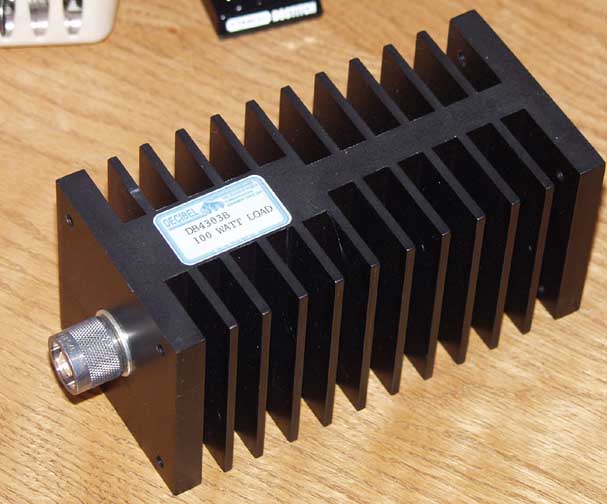
West Mountain PwrGate Controller
Another important piece of equipment often overlooked is the User Manuals. I cannot say how many times I have been told to RTFM (Read The Fine Manual), and equally as many times it has saved my ass. I do have to confess that my book-reading for pleasure was replaced long ago by reference materials and technical bulletins. One of the easiest things to do is to compile all the manuals in .PDF format and put them in your My Documents folder. If you have the ambition, write the manuals to a CD or DVD (depending on size) and if you have a duplex (print on both sides) printer, print them out and place them in a 3-ring binder. Personally my 3-ring binders tend to come out more like a 3-ring circus, but you get the drift of what I am trying to say.
Here is a shot of the setup on the kitchen table:

There isn't a lot of detail you can see in this shot but I will post more about the specific setup. I know a lot of you are thinking 'Jeez, just bring your rig and set it up, no need for all this extra crap...' and at times I tend to agree. But that is what eventually makes the difference between an average station and a top-scoring station. Field Day isn't just an exercise, it is a contest.
I Was Wrong Yet Again...
Windows 7 DOES do full-duplex out-of-the-box...
 Here is the dialog box that controls this action, I overlooked this in my overzealous attempt to bash Microscum's new OS. I guess I can chalk this up to yet another instance where this new OS is waaay smarter than we are, but I WAS correct when I said you will love this OS for the control it gives you. It just WORKS.
Problem is, when you use this control it introduces a bit of a digital delay into the recorded audio, probably an attempt by the almighty Microsmut to prevent feedback when monitoring a high output condenser mic. I can still use the playback control registry hack in the same exact fashion as before, WITHOUT the delay as well. Either one will work, it just depends if you are monitoring your own voice in full-duplex. The delay will throw you for a loop...
The codebase of the OS is a cumulation of NT, XP, Vista and it shows. This is a mature, stable platform that takes up less space and because of that, will appear to run faster and better than any OS you can install on the computer. I can say this because I have installed several different OS's on this laptop, in several different configurations. Currently I am in the process of obtaining a version of OS X that I will be able to run on this machine, too bad there isn't the software base for OS X and Linux that there is for Winslowz, not that I would run anything else at Field Day anyway...
And that includes OS X, this is gonna blow Mac users away. They will never admit it, but this Win 7 thing is gonna revolutionize how people interface with computers. It is the EXACT thing Microsnuff needs to do in order to make up for the failed Vista attempt... When 4-year-olds can run Win 7 without difficulty it kinda sez something about computers - They have truly become just a tool to do things. The OS doesn't necessarily matter anymore (unless you are doing specialized things) if you are only getting info or communicationg, the ability to integrate this tech stuff into our society is key in unlocking the educational process. Everyone gets smarter because of these technical advances, and in turn general crime goes down, but unfortunately terrorists get smarter too, so you can draw your own conclusions there. Best part is that your kids get to do things you only imagined as a child yourself. Truly amazing.
Friday, May 29, 2009
You're Gonna Love Windows 7...
Because it works. It just WORKS.
It is almost CREEPY how well it works. You just put the DVD in, and boot. Answer a couple simple questions, choose some drive options if you want (optional) and go. Come back 15 minutes later and it asks you what you want to call the computer and your account. Simple enough for a Mac user to do all by themself.
Now to see if it will do full-duplex... nope. At least not without some modifications...
Apparently I need to have the Sigmatel HD Audio driver installed in order for the Dell Latitude D630 to do full duplex. But yes, with the registry modifications listed in a previous post, I can get the laptop to do full-duplex on Windoze 7 easily. Works great now!
Windows 7 comes with almost every driver known to man, except for some older or possibly specialized devices. The audio came up easily on this laptop by default out-of-the-box, using the Microsux driver built into the OS. It hasn't recognized the USB-to-serial adapter yet, and I don't quite know if I even need it (this laptop has a 9-pin serial port), but it would be nice to have multiple serial ports available if necessary. Problem is, I don't know if I wanna deal with the inherent latency of the USB operated stuff...
Win 7 runs incredibly fast, on this laptop it is not a fair comparison to what most people run, but I installed it on a Dell Dimension 2400 desktop system this morning (32-bit version) and it is fine. The system is a single-core 2.8GHz machine with standard integrated Intel video and networking. It ran XP before (not great) but WIn 7 runs as well or better. I did need to trick the video driver so that I could get it to display a resolution greater than 640X480, but everything else was recognized easily and the system joined my domain after I authenticated properly.
The trick I used to fool the system is a standard procedure that is commonly used for 'compatibility'. The Dell 2400 has integrated Intel video on the motherboard, and unfortunately it is old enough (from 2004) so that Microskank feels it doesn't need to include drivers. So what if it is only 64M video? I extracted the video driver I got from Dell's Support site to a spot on the hard drive, and then ran the Setup.EXE file in 'compatibility' mode. This effectively removes the driver header information that specifies the designed OS from the .inf file and allows the program to run despite the OS mismatch. Worked great, and I had resolutions up to 1280X1024 when I was done. Piece of cake...
N3FJP Field Day Logger 2.8 seems to install and run fine, I will give it a workout this weekend when I get a chance to record some audio. I also wanna try GoldWave vs. Audacity to see where the better/easier audio will come from. I have never used Audacity, maybe Brad N1JIF can give me a hand. He also said he would snap some shots (not like I couldn't do it...) of the setup so we have something to refer to when it comes time to set it up again. I mainly wanna get shots of the RigBlaster jumper setup, we may need to change that if we have to switch to the backup rig (Yaesu FT-897). I have a feeling the backup rig can be used for VHF/UHF very easily, I think I will bring the truck-mounted mast down. I have a rotor for the thing (light-duty) all we need is a decent 2M/440 beam and an amp or two. We are allowed 150 watts you know...
I still can't get over how slick Win 7 installs and gets up and running. I started the install at 9:PM, and it is 10:30 and I have been blogging on the laptop for over 30 minutes now. Even when I go look for problems, it apparently just takes care of itself with a button-click or a check-box. It DOES take a little getting used to, but if you have used Vista it will be easy to migrate your skills. Moving from XP to Win 7 will throw you for a loop if you aren't ready for it, you will ask yourself over and over 'Where the hell did they put it this time?'.
One neat aspect of the new OS that photographers will like is the ability to calibrate your monitor. This is HUGE. Color accuracy isn't so much a big deal to color-blind people like me, but I have always felt that because of my handicap I have an increased sense of contrast and dynamic range. I think I can see better than most in the dark, and I can tell subtle differences in things others might miss. I can't tell green from brown, but I can see details...
 I am certain it will become a bit more cluttered than this as I get things installed. This evaluation doesn't run out until March of next year (June actually...) and the HD I installed this on is only 120G, so I imagine I can't cram too much crap into this. Time will tell.
It is almost CREEPY how well it works. You just put the DVD in, and boot. Answer a couple simple questions, choose some drive options if you want (optional) and go. Come back 15 minutes later and it asks you what you want to call the computer and your account. Simple enough for a Mac user to do all by themself.
Now to see if it will do full-duplex... nope. At least not without some modifications...
Apparently I need to have the Sigmatel HD Audio driver installed in order for the Dell Latitude D630 to do full duplex. But yes, with the registry modifications listed in a previous post, I can get the laptop to do full-duplex on Windoze 7 easily. Works great now!
Windows 7 comes with almost every driver known to man, except for some older or possibly specialized devices. The audio came up easily on this laptop by default out-of-the-box, using the Microsux driver built into the OS. It hasn't recognized the USB-to-serial adapter yet, and I don't quite know if I even need it (this laptop has a 9-pin serial port), but it would be nice to have multiple serial ports available if necessary. Problem is, I don't know if I wanna deal with the inherent latency of the USB operated stuff...
Win 7 runs incredibly fast, on this laptop it is not a fair comparison to what most people run, but I installed it on a Dell Dimension 2400 desktop system this morning (32-bit version) and it is fine. The system is a single-core 2.8GHz machine with standard integrated Intel video and networking. It ran XP before (not great) but WIn 7 runs as well or better. I did need to trick the video driver so that I could get it to display a resolution greater than 640X480, but everything else was recognized easily and the system joined my domain after I authenticated properly.
The trick I used to fool the system is a standard procedure that is commonly used for 'compatibility'. The Dell 2400 has integrated Intel video on the motherboard, and unfortunately it is old enough (from 2004) so that Microskank feels it doesn't need to include drivers. So what if it is only 64M video? I extracted the video driver I got from Dell's Support site to a spot on the hard drive, and then ran the Setup.EXE file in 'compatibility' mode. This effectively removes the driver header information that specifies the designed OS from the .inf file and allows the program to run despite the OS mismatch. Worked great, and I had resolutions up to 1280X1024 when I was done. Piece of cake...
N3FJP Field Day Logger 2.8 seems to install and run fine, I will give it a workout this weekend when I get a chance to record some audio. I also wanna try GoldWave vs. Audacity to see where the better/easier audio will come from. I have never used Audacity, maybe Brad N1JIF can give me a hand. He also said he would snap some shots (not like I couldn't do it...) of the setup so we have something to refer to when it comes time to set it up again. I mainly wanna get shots of the RigBlaster jumper setup, we may need to change that if we have to switch to the backup rig (Yaesu FT-897). I have a feeling the backup rig can be used for VHF/UHF very easily, I think I will bring the truck-mounted mast down. I have a rotor for the thing (light-duty) all we need is a decent 2M/440 beam and an amp or two. We are allowed 150 watts you know...
I still can't get over how slick Win 7 installs and gets up and running. I started the install at 9:PM, and it is 10:30 and I have been blogging on the laptop for over 30 minutes now. Even when I go look for problems, it apparently just takes care of itself with a button-click or a check-box. It DOES take a little getting used to, but if you have used Vista it will be easy to migrate your skills. Moving from XP to Win 7 will throw you for a loop if you aren't ready for it, you will ask yourself over and over 'Where the hell did they put it this time?'.
One neat aspect of the new OS that photographers will like is the ability to calibrate your monitor. This is HUGE. Color accuracy isn't so much a big deal to color-blind people like me, but I have always felt that because of my handicap I have an increased sense of contrast and dynamic range. I think I can see better than most in the dark, and I can tell subtle differences in things others might miss. I can't tell green from brown, but I can see details...
Here is what my current Win 7 desktop looks like, I know it is hard to see because the resolution of the text is so small (1440X900) but you can get an idea at least of how the interface looks.
I am certain it will become a bit more cluttered than this as I get things installed. This evaluation doesn't run out until March of next year (June actually...) and the HD I installed this on is only 120G, so I imagine I can't cram too much crap into this. Time will tell.
Subscribe to:
Posts (Atom)