Apparently I have offended Mac users again.
Let me put it this way - If I haven't offended you, stay tuned, your time will come. I gotta admit, I am not trying to piss anyone off in particular, I do find it truly unfortunate if you fall into one of the groups I may poke a little fun at from time to time. My intent is not to offend anyone, but to point out shortcomings in inferior products, services, companies and ultimately, in society itself.
To say something is 'so easy a Mac user could do it' is not a phrase that I invented. Again I have to admit I heard that one somewhere, and it rung so true I had to repeat it. Call it plagurism or whatever you want, but even you have to admit Mac users are either stupid, or lazy. Personally, because I am a Mac user, I fall into the lazy end of that spectrum. Now if I cannot poke a bit of fun at myself, then our society and its political correctness has truly come full circle and we are living in a communist country. I know this is not the case.
I use a Mac when I WANT to, and I suppose it really all boils down to choice. If you choose to use a Mac you are lazy. If you HAVE to use a Mac you are stupid. Simple, huh? Sometimes people point out to me the difference between stupidity and ignorance, and while I possibly have the definitions reversed in my mind, it still is a shame. Plain outright disgraceful. I have always said that I can understand stupidity, but there is no excuse for ignorance. Laziness is another story altogether, laziness is just genius disguized in arrogance.
There is nothing you can do on a Mac that cannot be done on a PC, the reverse holds true. This has been the case for quite some time now, at least since OS X 10.4.11. That is the version that will allow Active Directory 'binding'. Basically that means your Windows Domain can recognize a Mac and that your Domain account can 'pass through' the authentication necessary to gain Domain permissions. What does that mean in layman's terms? It means your Mac will finally work (somewhat) in the corporate business world where we all live and play. It has left the 'home' domain and entered the real world.
Does this mean I will abandon all my PC's and cross to the dark side of OS X? Not friggin' hardly. Same way I am not EVER gonna abandon my Nikons and join the Canon camp. While there are some who might state 'the best hardware for running Windows is made by Apple', there are also those who have risen above the Mac vs. PC war and instead of wasting time arguing about which is better, are actually using computers for their designed intent - as a tool to navigate the socio-political labrynth we must compete in on a daily basis.
I may use a Mac from time to time, same way I will probably use a PowerShot when I want to. To me it is all about choice. I do what I want, not because I have to but because I choose to. If that makes any sense... (read - psychobabble...) It is kinda like using the best tool for the job at hand. If you only have a Leatherman instead of a full toolbox, you use what you need to to get the job done. This is the pitfall many Mac users fall into. Instead of possibly using their money in the best possible fashion, they tend to waste most of it because of two reasons I have previously mentioned.
There are those who will say that Macs are less prone to viruses than PC's. There are hundreds of arguments in either direction, but suffice it to say there are more viruses and attacks written for the UNIX platform than anything else. And what is OS X written/based upon? UNIX. Try telling the poor lady whose Safari browser has been hijacked by Malware and has a million pop-ups telling her that her computer needs new virus detection software that Macs are better. Apparently, they look pretty much the same as a PC.
Again, place either platform in front of me and I will pretty much be able to do the things I need to do without too much trouble. I will bet right now you cannot tell if I have typed this blog post on a Mac or a PC. In the truest sense of the word it really doesn't matter, does it? Marshall McLuhan said it best when he described popular culture with the statement 'The Medium Is The Message...'.
Anyway, my point is, I choose to poke fun at stereotypical users, and I have very little tolerance for incompetence. Same way I will pick on the Goths, the Towel-Heads and the Wetbacks, it was not I that invented these racial slurs. Is it immature and evil to refer to people in this manner? Yes. Do you fit into one of those groups? If so, it really does suck being you. Same way I fall into the stereotypical white, overweight, Type A male model. It sux being me too.
It sucks being me because I have to deal with the Mac users and other general incompetence so prevalent in our society today. It is even more so here in the Upper Valley. I truly find it amazing and sometimes wonder as I try to fall asleep at night, how the majority of people around here got and actually keep their jobs. Don't get me wrong here, there are people who actually know how to maintain their computers and networks around here, but like anywhere else, they are few and far between.
This is the exact reason our society as a whole is shifting away from computers as we knew them in the '90's toward a more manageable 'personal device' model such as the cell phone and PDA. To pick up where McLuhan left off and to make the statement that PDA's will revolutionize how we learn, communicate and generally interface with others is a natural statement, but I fear that the technology that lead us to this point will generally be ignored, much like the industrial revolution, and lead to the downfall of American society as we currently acknowledge it.
More psychobabble, I know, but it is relevant. It is because we are lazy and stupid Mac users.
Friday, June 5, 2009

Thursday, June 4, 2009
Finally. Play and Burn DVD's in Win 7
No need for extra programs... it is built-in!
That's right kiddies, no need for extra dedicated DVD software anymore, it is finally built into Microshaft Windows 7. It is kinda refreshing to see that they hired some developers from Apple right out from under Steve Job's nose to include the crap that should have been in there from the start.
So, you install Win 7, and after it is all updated you decide to put in a DVD to watch a movie. I did this just to see if it would work, and lo-and-behold, it does! Holy Blu-Ray Batman! What is even better is that you can now just drag files to a blank DVD (if you have a DVD writer) and then click burn-to-disc. Windows Explorer now supports native burning to DVD!
Goodbye Nero, so long WinDVD and PowerDVD! I don't need to run additional brain-dead applications just to do basic functions that should have been included from the get-go. Let's see what else it can do...
Maybe I wanna take all the neat new digital video I just shot and create a cohesive movie of clips, think I can do that? Yup. Run what is called Windows DVD Maker and you are all set. I gotta admit I haven't tried to use it to actually make a DVD movie (I have no digital video recorder...) but I have played with it a bit to see what it actually does. I will bet the media types out there will still feel they need some fancy-schmancy additional ill-behaved app to do this like Adobe Premiere or some other movie-maker program, but by and large, when you turn your 4-year old loose with all you electronic crap they will be the next Martin Scorsese in no time at all.
But when you are facing a class full of students and you pop the DVD in of the coolest movie you ever saw, hoping Windoze Media Player will handle things on your newly upgraded machine, you needn't worry. Even if you need to setup Media Player by choosing Express Settings first, it won't take but a moment before the movie actually starts. No show-stopping message about some 'codec' not installed, it just plays. Like I have said before, Win 7 just works.
Don't get me wrong, I am certainly not on the Microstink payroll, nor do I advocate everyone install this new OS on their computer(s). Personally I feel if you are not smart enough to maintain your OS (read Mac user here) you don't deserve to use a computer, much less own one. I just think I can spot a good one in a row of mediocre OS's. I think I have been around a bit (others might say I am about as round as one can get...) and having used, programmed, built and maintained computer systems and networks since the '70's I feel I might be able to give a bit of advice now and then. This OS is good, but I am absolutely certain there will be those who will bash it no matter what. I might even be one of them...
Take for example Windowz Media Player. It has to compete with iTunes. Can you connect your iPod? No. You need to run iTunes to sync your iPod. Why? Because Apple pulled a microsoft. (lower case noun) Also take for example when one might play a DVD. When you want to skip to the next chapter, what button do you press? PageDown? Of course. How about pause the movie? SpaceBar? Yup. All major DVD software does this, or allows you to program the keys you want to do this. What about Media Player? Guess again.
To advance to the next chapter of a movie DVD playing in Media Player, you press Ctrl-F .What the hell? What does the F key have to do with chapters? Not even the arrow keys work in Media Player. Microstupid - Take a hint... Develop Media Player into a mature program instead of allowing it to suffer Alzheiumers and turn into yet another brain-dead, ill-behaved add-on application. What the hell were you thinking? How about using the mouse wheel to advance the speed (or decrease it...) and setting it up so I can sync an iPod? What about removing all the advertizing crap with all these unnecessary 'stores' to buy songs? The only time I want to think about 'Urge' is when I take a crap. This doesn't even mention DRM (Digital Rights Management) which has turned into a porn-spam sending scam when you try to play someone else's idea of 'protected' content. If you wanna protect something, sell it in a real store at a price people will be willing to pay for it. If your music sucks, then give it away. If you wanna sell a million copies of your new movie, sell it for $1.99 on a self-destructing DVD. Nobody is gonna waste $2.25 for a DL DVD to copy a $1.99 movie...
And make Media Player work like it used to... When I play an album, put the album cover in the middle of the friggin' screen. If you are gonna put a 'Lyrics' button somewhere, there ought to by lyrics behind the button when I click on it. Not a window where I can type in text... And give me a remote control. Infared has been built into computers since the '80's, it is just a freakin' LED for crying out loud. And also, let me use the IR built into my computer to control my TV and stereo. I do have to admit I don't necessarily like the idea of a $1900 remote, but you gotta admit, it certainly would be convenient.
But then again, this is only the Release Candidate! (RC... is just another term for Beta) I can only imagine what it will be like when the full version is released in October. Yes, kiddies, OCTOBER. Chances are the upgrade version will be out-the-door in August, personally I would hold out for the full Win 7 Ultimate version, it is what I am running now in RC, and seems to do almost everything right. I imagine I will start planning for the Business version where I work (school), even then it won't be at least until next summer when I roll it out. Hopefully it will be available on the new Dell's in some sort of affordable version.
Native support for this kind of stuff should have been included as far back as Win '95, but Microsux in their infinite corporate wisdom decided that it was more important to spawn the 'Accessory Application' market and charge developers not only for their OS, but for the rights to develop stuff for their OS. Kinda like the grocery store charging for food, and then charging you again for the rights to cook it. Brilliant strategy, compliments of Steve Ballmer. He learned it from Bill Gates back in college. If you don't believe me, watch the DVD Pirates Of Silicon Valley sometime. You will find out the real suckers aren't the American people, but IBM and XEROX.
But wait! I just rented this DVD Pirates Of Silicon Valley, and I now want to add it to my library of other 'pirated' DVD's... (just kidding, I don't advocate stealing anything, if I have to pay for it YOU should have to as well... I don't have a library at all.) For this example, I am not allowed to duplicate a DVD, especially a copyrighted one at that.
Maybe THERE IS a market for brain-dead, ill-behaved apps after all...
That's right kiddies, no need for extra dedicated DVD software anymore, it is finally built into Microshaft Windows 7. It is kinda refreshing to see that they hired some developers from Apple right out from under Steve Job's nose to include the crap that should have been in there from the start.
So, you install Win 7, and after it is all updated you decide to put in a DVD to watch a movie. I did this just to see if it would work, and lo-and-behold, it does! Holy Blu-Ray Batman! What is even better is that you can now just drag files to a blank DVD (if you have a DVD writer) and then click burn-to-disc. Windows Explorer now supports native burning to DVD!
Goodbye Nero, so long WinDVD and PowerDVD! I don't need to run additional brain-dead applications just to do basic functions that should have been included from the get-go. Let's see what else it can do...
Maybe I wanna take all the neat new digital video I just shot and create a cohesive movie of clips, think I can do that? Yup. Run what is called Windows DVD Maker and you are all set. I gotta admit I haven't tried to use it to actually make a DVD movie (I have no digital video recorder...) but I have played with it a bit to see what it actually does. I will bet the media types out there will still feel they need some fancy-schmancy additional ill-behaved app to do this like Adobe Premiere or some other movie-maker program, but by and large, when you turn your 4-year old loose with all you electronic crap they will be the next Martin Scorsese in no time at all.
But when you are facing a class full of students and you pop the DVD in of the coolest movie you ever saw, hoping Windoze Media Player will handle things on your newly upgraded machine, you needn't worry. Even if you need to setup Media Player by choosing Express Settings first, it won't take but a moment before the movie actually starts. No show-stopping message about some 'codec' not installed, it just plays. Like I have said before, Win 7 just works.
Don't get me wrong, I am certainly not on the Microstink payroll, nor do I advocate everyone install this new OS on their computer(s). Personally I feel if you are not smart enough to maintain your OS (read Mac user here) you don't deserve to use a computer, much less own one. I just think I can spot a good one in a row of mediocre OS's. I think I have been around a bit (others might say I am about as round as one can get...) and having used, programmed, built and maintained computer systems and networks since the '70's I feel I might be able to give a bit of advice now and then. This OS is good, but I am absolutely certain there will be those who will bash it no matter what. I might even be one of them...
Take for example Windowz Media Player. It has to compete with iTunes. Can you connect your iPod? No. You need to run iTunes to sync your iPod. Why? Because Apple pulled a microsoft. (lower case noun) Also take for example when one might play a DVD. When you want to skip to the next chapter, what button do you press? PageDown? Of course. How about pause the movie? SpaceBar? Yup. All major DVD software does this, or allows you to program the keys you want to do this. What about Media Player? Guess again.
To advance to the next chapter of a movie DVD playing in Media Player, you press Ctrl-F .What the hell? What does the F key have to do with chapters? Not even the arrow keys work in Media Player. Microstupid - Take a hint... Develop Media Player into a mature program instead of allowing it to suffer Alzheiumers and turn into yet another brain-dead, ill-behaved add-on application. What the hell were you thinking? How about using the mouse wheel to advance the speed (or decrease it...) and setting it up so I can sync an iPod? What about removing all the advertizing crap with all these unnecessary 'stores' to buy songs? The only time I want to think about 'Urge' is when I take a crap. This doesn't even mention DRM (Digital Rights Management) which has turned into a porn-spam sending scam when you try to play someone else's idea of 'protected' content. If you wanna protect something, sell it in a real store at a price people will be willing to pay for it. If your music sucks, then give it away. If you wanna sell a million copies of your new movie, sell it for $1.99 on a self-destructing DVD. Nobody is gonna waste $2.25 for a DL DVD to copy a $1.99 movie...
And make Media Player work like it used to... When I play an album, put the album cover in the middle of the friggin' screen. If you are gonna put a 'Lyrics' button somewhere, there ought to by lyrics behind the button when I click on it. Not a window where I can type in text... And give me a remote control. Infared has been built into computers since the '80's, it is just a freakin' LED for crying out loud. And also, let me use the IR built into my computer to control my TV and stereo. I do have to admit I don't necessarily like the idea of a $1900 remote, but you gotta admit, it certainly would be convenient.
But then again, this is only the Release Candidate! (RC... is just another term for Beta) I can only imagine what it will be like when the full version is released in October. Yes, kiddies, OCTOBER. Chances are the upgrade version will be out-the-door in August, personally I would hold out for the full Win 7 Ultimate version, it is what I am running now in RC, and seems to do almost everything right. I imagine I will start planning for the Business version where I work (school), even then it won't be at least until next summer when I roll it out. Hopefully it will be available on the new Dell's in some sort of affordable version.
Native support for this kind of stuff should have been included as far back as Win '95, but Microsux in their infinite corporate wisdom decided that it was more important to spawn the 'Accessory Application' market and charge developers not only for their OS, but for the rights to develop stuff for their OS. Kinda like the grocery store charging for food, and then charging you again for the rights to cook it. Brilliant strategy, compliments of Steve Ballmer. He learned it from Bill Gates back in college. If you don't believe me, watch the DVD Pirates Of Silicon Valley sometime. You will find out the real suckers aren't the American people, but IBM and XEROX.
But wait! I just rented this DVD Pirates Of Silicon Valley, and I now want to add it to my library of other 'pirated' DVD's... (just kidding, I don't advocate stealing anything, if I have to pay for it YOU should have to as well... I don't have a library at all.) For this example, I am not allowed to duplicate a DVD, especially a copyrighted one at that.
Maybe THERE IS a market for brain-dead, ill-behaved apps after all...
Wednesday, June 3, 2009
Remove the ANNOYING Shortcut Arrow
This describes how to get rid of the shortcut arrow overlay...
(credit goes to WinHelpOnline)
(credit goes to WinHelpOnline)
Remove or modify the Shortcut overlay
Method 1
Download Vista Shortcut Overlay Remover (FxVisor) from frameworkx. FxVisor allows you to either way to modify or remove the shortcut overlay arrow in Windows 7 and Vista. Here is the screenshot of that utility: (screenshot removed becaause they are assholes)
Method 2
Removing the shortcut arrow: Download blank_icon.zip and extract the file blank.ico to a folder of your choice. In this example, we use C:\Icons\blank.ico as the path to the icon file you downloaded. And then follow these steps:
- Click Start, type regedit.exe and press ENTER
- Navigate to the following branch:
HKEY_LOCAL_MACHINE \ SOFTWARE \ Microsoft \ Windows \ CurrentVersion \ explorer \ Shell Icons
- In the right pane, create a new String value (REG_SZ) named 29
- Double-click 29 and set its Value data as C:\Icons\blank.ico
- Close Regedit.exe and restart Windows
Note: If the Shell Icons branch does not exist already, you'll need to create it.
LET ME MAKE THIS DISCLAIMER - Editing the registry can be dangerous to your computer and your sanity. I cannot be held liable for anything you do while editing the registry of your computer. If you have never edited the registry, or if you feel uncomfortable even thinking about editing the registry, give your laptop to some geek who has done it before, and let them do it for you.
Credits: The overlay icon above (blank.ico) for Windows Vista was created using the freeware IcoFX utility. Thanks to the folks at IcoFX for helping me successfully create an overlay icon for Windows Vista.
Setting Light arrow overlay: If you wish to use a light arrow for Shortcuts, you may do so by downloading lightarrow.zip (includes lightarrow.ico). Copy lightarrow.ico to your Icons folder, and set the Value data for 29 accordingly (see Step 4 above). If you've copied lightarrow.ico to your C:\Icons folder, the Value data would be C:\Icons\lightarrow.ico
Please note I could not get Method 1 to work in Windows 7, Method 2 worked fine!
AHCI SATA mode versus ATA mode...
Is your drive performing at its maximum capacity?
If you are running in ATA mode, probably not. But then again, it depends on if you have a SATA drive or not... A 3GBPS SATA drive will perform better in AHCI mode than it will in regular ATA mode.
What the hell are all these acronyms anyway? Well, in an effort to not bore anyone or actually put them to sleep, here is a brief explanation. (you can get this too, from Google or Wikipedia...)
ATA= Advanced Technology Attachment (also known as Parallel ATA or PATA)
SATA= Serial Advanced Technology Attachment
AHCI= Advanced Host Controller Interface
GBPS= Giga Bytes Per Second (not giga BITS per second, which is different...)
DMA= Direct Memory Access
SCSI= Small Computer System Interface
SSD= Solid State Drive
Suffice it to say that AHCI is a better implementation, or a more ADVANCED version of ATA. It allows for things such as hot-swapping and native command queuing that make drive access and sustained throughput rates faster and larger, respectively. It is a standard that is NOT supported by XP, partially implemented in Vista and has native support in Windows 7.
Will your computer support this new mode? Chances are, if it shipped with Vista installed, then yes. Only way to tell is to check the BIOS, in my case the laptop shipped with Vista downgraded to XP and because of the lack of support for this mode in XP the default from Dell was OFF.
So what do I do? I see it is off, so I enable it in the BIOS. Then try to boot... Instant BSOD (Blue Screen Of Death). Seems as though if you don't enable it upon initial installation, then the OS isn't prepared for it properly. (driver needs to load first...) You can first change the registry entry that loads the driver, then enable it in the BIOS upon next restart though. Let me warn you again - Editing the registry can be dangerous to your computer and your sanity. I cannot be held liable for anything you do while editing the registry of your computer. If you have never edited the registry, or if you feel uncomfortable even thinking about editing the registry, give your laptop to some geek who has done it before, and let them do it for you.
Couple AHCI mode with a fast hard drive and you get wicked, almost evil performance from your hard drive. Unless you are running a fiber-channel SCSI drive subsystem you can attain the fastest drive access using AHCI mode and hi-RPM drives. (talking 7200 RPM and greater) The only other thing that can begin to compete is SSD, which has no moving parts and can achieve faster access times. Throughput is a problem with SSD, and here is where large, fast AHCI SATA drives can outperform anything else.
In all reality we are talking about nanoseconds here, chances are as humans we wouldn't see any difference. I can hear many of you saying 'Who gives a shit anyway, I just want Windows to BOOT..." And I understand that. It is just that I want more out of my stuff than the regular guy on the street. I want it to do all it is supposed to do. If it has a 'regular' and 'fast' mode I am gonna choose FAST. And I think YOU should do that too. If it doesn't work, MAKE it work. If you don't know how to make it work, then LEARN how to do it.
If I can do it, you can too.
If you are running in ATA mode, probably not. But then again, it depends on if you have a SATA drive or not... A 3GBPS SATA drive will perform better in AHCI mode than it will in regular ATA mode.
What the hell are all these acronyms anyway? Well, in an effort to not bore anyone or actually put them to sleep, here is a brief explanation. (you can get this too, from Google or Wikipedia...)
ATA= Advanced Technology Attachment (also known as Parallel ATA or PATA)
SATA= Serial Advanced Technology Attachment
AHCI= Advanced Host Controller Interface
GBPS= Giga Bytes Per Second (not giga BITS per second, which is different...)
DMA= Direct Memory Access
SCSI= Small Computer System Interface
SSD= Solid State Drive
Suffice it to say that AHCI is a better implementation, or a more ADVANCED version of ATA. It allows for things such as hot-swapping and native command queuing that make drive access and sustained throughput rates faster and larger, respectively. It is a standard that is NOT supported by XP, partially implemented in Vista and has native support in Windows 7.
Will your computer support this new mode? Chances are, if it shipped with Vista installed, then yes. Only way to tell is to check the BIOS, in my case the laptop shipped with Vista downgraded to XP and because of the lack of support for this mode in XP the default from Dell was OFF.
So what do I do? I see it is off, so I enable it in the BIOS. Then try to boot... Instant BSOD (Blue Screen Of Death). Seems as though if you don't enable it upon initial installation, then the OS isn't prepared for it properly. (driver needs to load first...) You can first change the registry entry that loads the driver, then enable it in the BIOS upon next restart though. Let me warn you again - Editing the registry can be dangerous to your computer and your sanity. I cannot be held liable for anything you do while editing the registry of your computer. If you have never edited the registry, or if you feel uncomfortable even thinking about editing the registry, give your laptop to some geek who has done it before, and let them do it for you.
Couple AHCI mode with a fast hard drive and you get wicked, almost evil performance from your hard drive. Unless you are running a fiber-channel SCSI drive subsystem you can attain the fastest drive access using AHCI mode and hi-RPM drives. (talking 7200 RPM and greater) The only other thing that can begin to compete is SSD, which has no moving parts and can achieve faster access times. Throughput is a problem with SSD, and here is where large, fast AHCI SATA drives can outperform anything else.
In all reality we are talking about nanoseconds here, chances are as humans we wouldn't see any difference. I can hear many of you saying 'Who gives a shit anyway, I just want Windows to BOOT..." And I understand that. It is just that I want more out of my stuff than the regular guy on the street. I want it to do all it is supposed to do. If it has a 'regular' and 'fast' mode I am gonna choose FAST. And I think YOU should do that too. If it doesn't work, MAKE it work. If you don't know how to make it work, then LEARN how to do it.
If I can do it, you can too.
Monday, June 1, 2009
64-Bit versus 32-Bit...
It really is a bigger difference than you think.
The biggest difference I am finding is that manufacturers are very slow to adopt power users who have the where-with-all to install and actually use 64-bit computers. Some are better than others, of course, and generally the software giants like Microslam and Adobe are the leaders of the pack. Or so you would think...
Adobe took years to release a 64-bit Flash Player for browsers, but yet were the first in line to support 64-bit with Lightroom and Photoshop. I guess the software for the masses didn't outweigh the need for the few. But software isn't necessarily all that needs 64-bit support...
Think about the hardware you have and the need for specific drivers that allow that software to work on your 64-bit system. Dell and HP are leaders in the server world, their stuff is used by the giants (Google, Amazon, etc.) and even NASA is starting to gear their smaller stuff toward 64-bit computing. But you cannot run a 64-bit OS unless all your hardware works that is attached to your computer. This means display adapters (video cards) and sound cards HAVE to work, it is imperative that anything you might want to attach to your computer be allowed to function.
This includes perhiperals such as USB devices and printers. Now, Microsnuff has done a pretty good job of including whatever they can find in their newest OS's, but rinky-dink perhiperal manufacturers need to follow suit and either provide the drivers or post them in a place where people can find them such as their corporate website. If they can take the time to provide 32-bit drivers for Vista, there isn't any reason why they can't do the same for 64-bit OS's as well.
But I have seeminly ignored the reasons for running a 64-bit OS, which is why all of you have tuned in to this blog in the first place... SPEED. Not stability, and certainly not to show off in front of all your friends, but pure and simple, speed. The one thing that allows for this vast increase in computing power is the ability to address up to 16G (yes kiddies, that is 16 GIGABYTES) of RAM. 64-bit processors have been around for a while, but no one has really taken advantage of them until recently. The ability to cram 16G of ram on a motherboard has been around even longer, but to actually take advantage of ALL of it has come to life with the implementation of 64-bit processors and Operating Systems.
I can remember Windows Server Datacenter Edition, but it was geared towards multi-processing more that towards 64-bit and gobs of RAM. Now we can have both. But here is where it can get really sticky - What about quad-core CPU's? How do they fit into the mix?
If you think about it, and actually take the time to look at the 25-digit Product Key for your OS you will see that it is a license for 1-2 CPU's. What happens when you have a dual quad-core setup? Isn't that like 8 processors?
Technically - no. In practice, yes. It is actually 2 CPU's with a total of 8 CORES, that is, the ability to hyper-thread 8 different core processes at one time. Now Winslowz has had the ability to multi-process for years, but CORE processes are a much different beast. I am not gonna get into the details, as I have probably put many of you to sleep already with my psychobabble about computers...
Take it for a fact that more cores equals more power. More power equals more processes. More processes equals more programs running at once. And with all the crap running in the background on most computers we all need the most power we can get. At least I know I do... The ability to have enough memory (RAM) for all these applications (processes) is critical, hence the need for a 64-bit OS to be able to address more memory to give our apps more room to work, thereby finishing faster. It all equals SPEED.
And if you don't believe me, take 2 identical 64-bit capable machines whose hardware is configured exactly alike. Install a 32-bit OS on one, and an equal 64-bit OS on the other. (doesn't need to be MS stuff you can do this in UNIX as well) Tell me which one starts up faster, which one runns apps faster and which one can process a job faster. Now I know it has a lot to do with the surrounding sys-systems such as the drive subsystem and the graphics and such, but all things being equal, a 64-bit processor will perform better with a 64-bit OS in comparison to an identical 32-bit setup. Try it, you'll like it.
The biggest difference I am finding is that manufacturers are very slow to adopt power users who have the where-with-all to install and actually use 64-bit computers. Some are better than others, of course, and generally the software giants like Microslam and Adobe are the leaders of the pack. Or so you would think...
Adobe took years to release a 64-bit Flash Player for browsers, but yet were the first in line to support 64-bit with Lightroom and Photoshop. I guess the software for the masses didn't outweigh the need for the few. But software isn't necessarily all that needs 64-bit support...
Think about the hardware you have and the need for specific drivers that allow that software to work on your 64-bit system. Dell and HP are leaders in the server world, their stuff is used by the giants (Google, Amazon, etc.) and even NASA is starting to gear their smaller stuff toward 64-bit computing. But you cannot run a 64-bit OS unless all your hardware works that is attached to your computer. This means display adapters (video cards) and sound cards HAVE to work, it is imperative that anything you might want to attach to your computer be allowed to function.
This includes perhiperals such as USB devices and printers. Now, Microsnuff has done a pretty good job of including whatever they can find in their newest OS's, but rinky-dink perhiperal manufacturers need to follow suit and either provide the drivers or post them in a place where people can find them such as their corporate website. If they can take the time to provide 32-bit drivers for Vista, there isn't any reason why they can't do the same for 64-bit OS's as well.
But I have seeminly ignored the reasons for running a 64-bit OS, which is why all of you have tuned in to this blog in the first place... SPEED. Not stability, and certainly not to show off in front of all your friends, but pure and simple, speed. The one thing that allows for this vast increase in computing power is the ability to address up to 16G (yes kiddies, that is 16 GIGABYTES) of RAM. 64-bit processors have been around for a while, but no one has really taken advantage of them until recently. The ability to cram 16G of ram on a motherboard has been around even longer, but to actually take advantage of ALL of it has come to life with the implementation of 64-bit processors and Operating Systems.
I can remember Windows Server Datacenter Edition, but it was geared towards multi-processing more that towards 64-bit and gobs of RAM. Now we can have both. But here is where it can get really sticky - What about quad-core CPU's? How do they fit into the mix?
If you think about it, and actually take the time to look at the 25-digit Product Key for your OS you will see that it is a license for 1-2 CPU's. What happens when you have a dual quad-core setup? Isn't that like 8 processors?
Technically - no. In practice, yes. It is actually 2 CPU's with a total of 8 CORES, that is, the ability to hyper-thread 8 different core processes at one time. Now Winslowz has had the ability to multi-process for years, but CORE processes are a much different beast. I am not gonna get into the details, as I have probably put many of you to sleep already with my psychobabble about computers...
Take it for a fact that more cores equals more power. More power equals more processes. More processes equals more programs running at once. And with all the crap running in the background on most computers we all need the most power we can get. At least I know I do... The ability to have enough memory (RAM) for all these applications (processes) is critical, hence the need for a 64-bit OS to be able to address more memory to give our apps more room to work, thereby finishing faster. It all equals SPEED.
And if you don't believe me, take 2 identical 64-bit capable machines whose hardware is configured exactly alike. Install a 32-bit OS on one, and an equal 64-bit OS on the other. (doesn't need to be MS stuff you can do this in UNIX as well) Tell me which one starts up faster, which one runns apps faster and which one can process a job faster. Now I know it has a lot to do with the surrounding sys-systems such as the drive subsystem and the graphics and such, but all things being equal, a 64-bit processor will perform better with a 64-bit OS in comparison to an identical 32-bit setup. Try it, you'll like it.
Saturday, May 30, 2009
RigBlaster Pro Mic Wiring
I promised more detail, so here it is.
I have ripped the setup apart to make room for dinner on the kitchen table, so now I am cleaning this blog up by finishing the setup details. Brad N1JIF shot some closeups of the equipment as we ripped it all down, and I will compile the details in seperate posts.
I am getting ready to record the audio exchanges and put the finishing touches on the laptop setup and while all of this is fresh in my memory I have decided to document as much as I can to not only help me, but others who may have questions and are brave enough to navigate this blog for answers. The following info is direct from the RigBlaster Pro User Manual:
YAESU with 8 Pin Screw on Microphone Connectors
(This jumpering is for newer Yaesu radios that have Microphones with isolated PTT & audio grounds.)
INPUT SIDE
Pin #
1 Blue Shunt Jumper to Pin 1 OUTPUT Side
2 Blue Shunt Jumper to Pin 2 OUTPUT Side
3 Blue Shunt Jumper to Pin 3 OUTPUT Side
4 Blue Shunt Jumper to Pin 4 OUTPUT Side
5 White Jumper to PTT GND – INPUT Side
6 White Jumper to PTT – INPUT Side
7 White Jumper to MIC GND – INPUT Side
8 White Jumper to MIC – INPUT Side
OUTPUT SIDE
Pin #
5 White Jumper to PTT GND – OUTPUT Side
6 White Jumper to PTT – OUTPUT Side
7 White Jumper to MIC GND – OUTPUT Side
8 White Jumper to MIC – OUTPUT Side
Here is the diagram as published in the RigBlaster Pro manual:
 Here is the actual photo of the jumpers as I have them configured inside the RigBlaster Pro:
I have ripped the setup apart to make room for dinner on the kitchen table, so now I am cleaning this blog up by finishing the setup details. Brad N1JIF shot some closeups of the equipment as we ripped it all down, and I will compile the details in seperate posts.
I am getting ready to record the audio exchanges and put the finishing touches on the laptop setup and while all of this is fresh in my memory I have decided to document as much as I can to not only help me, but others who may have questions and are brave enough to navigate this blog for answers. The following info is direct from the RigBlaster Pro User Manual:
YAESU with 8 Pin Screw on Microphone Connectors
(This jumpering is for newer Yaesu radios that have Microphones with isolated PTT & audio grounds.)
INPUT SIDE
Pin #
1 Blue Shunt Jumper to Pin 1 OUTPUT Side
2 Blue Shunt Jumper to Pin 2 OUTPUT Side
3 Blue Shunt Jumper to Pin 3 OUTPUT Side
4 Blue Shunt Jumper to Pin 4 OUTPUT Side
5 White Jumper to PTT GND – INPUT Side
6 White Jumper to PTT – INPUT Side
7 White Jumper to MIC GND – INPUT Side
8 White Jumper to MIC – INPUT Side
OUTPUT SIDE
Pin #
5 White Jumper to PTT GND – OUTPUT Side
6 White Jumper to PTT – OUTPUT Side
7 White Jumper to MIC GND – OUTPUT Side
8 White Jumper to MIC – OUTPUT Side
Here is the diagram as published in the RigBlaster Pro manual:
Here is the actual photo of the jumpers as I have them configured inside the RigBlaster Pro:  The 2 jumpers to the right of the block are not connected to anything, they are for jumpering receive audio at the mic connector. Neither is the GNDTIE jumper on the block, the actual jumper sits on a single pin. Jumpering this introduces a horrible ground loop that gets passed on thru to the transmitter.
This wiring is for the Yaesu MD-100 mic, which is screwed into the front of the RigBlaster Pro via its 8-pin cable (8-pin RJ-45 modular to circular screw-on 8-pin). Output to the rig is accomplished out the back of the RigBlaster Pro through the 8-pin cable (8-pin modular RJ-45 to circular screw-on 8-pin) to a Yaesu CT-69 connector, which adapts an 8-pin to the modular 6-pin RJ-11 that is required by the FT-100D. The CT-69 contains a 27K resistor as well as a small capacitor (i dunno what the capacitor is for, but Randy N1GWL will explain it to me, as he as well as Chuck WA1NBU are the kings of capacitors) built into the 8-pin circular screw-on shell.
I will forego the MD-100 wiring for now, but I have successfully interfaced the MD-100 to the FT-100, the UP/DOWN buttons work and the audio is outstanding. Problem is, I haven't built the cable for the RigBlaster Pro yet... That requires yet another cable... If anyone wants the details, it is easy to email me for more info, or leave a comment.
Complete 40M-75M Field Day Setup
OK, here is my contribution, listed as best I can.
I hope KT1Q and N1GWL can list their contributions here as comments...
(note you can click on many items and view either the manufacturers site or the actual product itself)
Yaesu FT-100D HF-440 rig
Yaesu MD-100 Microphone
West Mountain RigBlaster Pro
Dell Latitude D630 running Win 7
Astron RS-50M Power Supply
West Mountain RigRunner 4010S
LDG Z-11 Pro Auto Tuner
Daiwa CN-101 SWR/Power Meter
Heil HC-4 ProSet headset
Bird Model 43 ThruLine Wattmeter
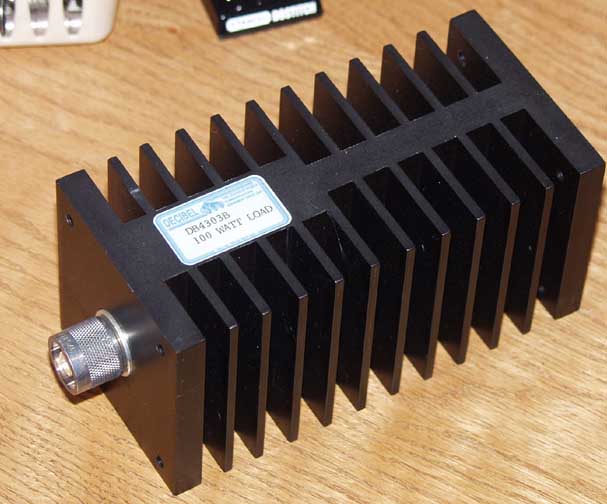
Decibel DB4303G Dummy Load
West Mountain PwrGate Controller
Another important piece of equipment often overlooked is the User Manuals. I cannot say how many times I have been told to RTFM (Read The Fine Manual), and equally as many times it has saved my ass. I do have to confess that my book-reading for pleasure was replaced long ago by reference materials and technical bulletins. One of the easiest things to do is to compile all the manuals in .PDF format and put them in your My Documents folder. If you have the ambition, write the manuals to a CD or DVD (depending on size) and if you have a duplex (print on both sides) printer, print them out and place them in a 3-ring binder. Personally my 3-ring binders tend to come out more like a 3-ring circus, but you get the drift of what I am trying to say.
Here is a shot of the setup on the kitchen table:

There isn't a lot of detail you can see in this shot but I will post more about the specific setup. I know a lot of you are thinking 'Jeez, just bring your rig and set it up, no need for all this extra crap...' and at times I tend to agree. But that is what eventually makes the difference between an average station and a top-scoring station. Field Day isn't just an exercise, it is a contest.
I hope KT1Q and N1GWL can list their contributions here as comments...
(note you can click on many items and view either the manufacturers site or the actual product itself)
Yaesu FT-100D HF-440 rig
Yaesu MD-100 Microphone
West Mountain RigBlaster Pro
Dell Latitude D630 running Win 7
Astron RS-50M Power Supply
West Mountain RigRunner 4010S
LDG Z-11 Pro Auto Tuner
Daiwa CN-101 SWR/Power Meter
Heil HC-4 ProSet headset
Bird Model 43 ThruLine Wattmeter

Decibel DB4303G Dummy Load
West Mountain PwrGate Controller
Another important piece of equipment often overlooked is the User Manuals. I cannot say how many times I have been told to RTFM (Read The Fine Manual), and equally as many times it has saved my ass. I do have to confess that my book-reading for pleasure was replaced long ago by reference materials and technical bulletins. One of the easiest things to do is to compile all the manuals in .PDF format and put them in your My Documents folder. If you have the ambition, write the manuals to a CD or DVD (depending on size) and if you have a duplex (print on both sides) printer, print them out and place them in a 3-ring binder. Personally my 3-ring binders tend to come out more like a 3-ring circus, but you get the drift of what I am trying to say.
Here is a shot of the setup on the kitchen table:

There isn't a lot of detail you can see in this shot but I will post more about the specific setup. I know a lot of you are thinking 'Jeez, just bring your rig and set it up, no need for all this extra crap...' and at times I tend to agree. But that is what eventually makes the difference between an average station and a top-scoring station. Field Day isn't just an exercise, it is a contest.
Subscribe to:
Posts (Atom)